
If you’ve ever gotten hit with a wave of failed login attempts on your WordPress site, your first instinct was probably the same as everyone else’s: change the login URL. Move it off the default /wp-admin or /wp-login.php, make it something random, and the bots will stop knocking.
We get why this feels like the right move. It’s fast, it’s free, and it feels like you’re doing something.
But it’s the wrong move. Here’s why, and what we recommend instead.
TL;DR
- Changing your login URL is security through obscurity, not real security. It hides the door, it doesn’t lock it.
- It can break plugins and themes that expect the default WordPress login structure, and it adds a layer of complexity every time you update your site.
- Bots find it anyway. Scanning tools and simple guesswork can rediscover a custom login URL, and if your site is a real target, obscurity buys you very little time.
- The WordPress community agrees. A widely discussed Reddit thread on this exact question lands on the same conclusion: stronger passwords, two-factor authentication, and login-limiting plugins like Wordfence do far more than a hidden URL ever will.
- What actually works: strong unique passwords, 2FA, a login-limiting security plugin, and keeping WordPress core, themes, and plugins updated.
The Login URL Myth: Security Through Obscurity
The idea behind hiding your login URL is called “security through obscurity.” The logic goes: if attackers can’t find the door, they can’t try to open it.
The problem is that obscurity isn’t the same as security. It doesn’t make your site harder to break into. It just makes it harder to find, which is a very different thing. As the team at Limit Login Attempts Reloaded points out in their breakdown of this exact issue, determined attackers can rediscover a custom login URL through scanning tools or by exploiting other parts of your site. Once they find it, all the same vulnerabilities are sitting there waiting, since you haven’t actually fixed anything underneath.
Watch the Wordfence team, leaders in WordPress Security, walk through the same conclusion below.
Why This “Fix” Can Backfire
Beyond the false sense of security, changing your login URL creates real, practical problems.
- Plugin and theme compatibility issues. A lot of WordPress plugins, including security plugins, expect the default login URL structure to function properly. Change that structure and you risk breaking the very tools meant to protect you.
- More maintenance headaches. Every core update, theme change, or new plugin becomes a spot where something can quietly stop working. That’s more time spent troubleshooting and more room for a critical update to get missed.
- Wasted server resources. Bots don’t stop trying just because the URL moved. They keep hitting the old one, generating 404 errors that still eat up server resources.
None of that is hypothetical. It’s the same pattern we see over and over with client sites: a “quick security fix” turns into a maintenance problem down the line.
What Reddit Thinks (And They’re Right)
We’re not the only ones saying this. A Reddit thread in r/Wordpress asked this exact question after the original poster kept getting brute-force login attempts, even after changing their login URL to a random string.
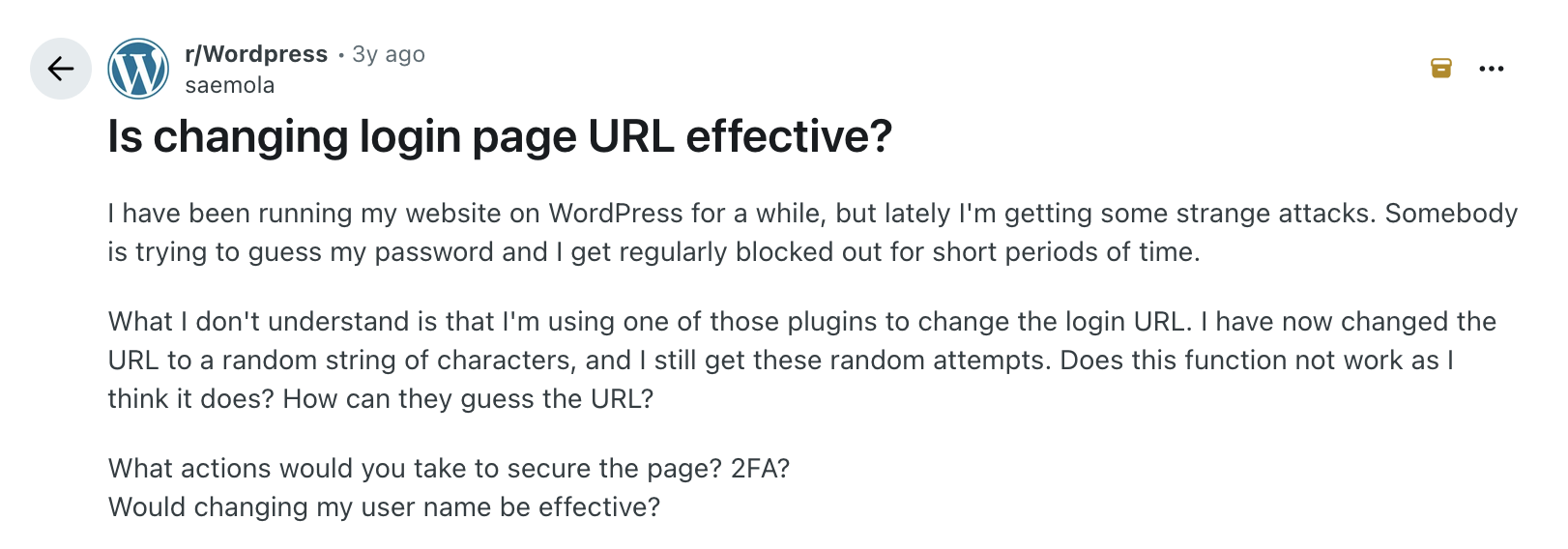
The replies are a good example of the WordPress community talking itself into the right answer in real time. Several commenters point toward Cloudflare and firewall-level protection as the more durable fix. But the comment that sums it up best is this one:
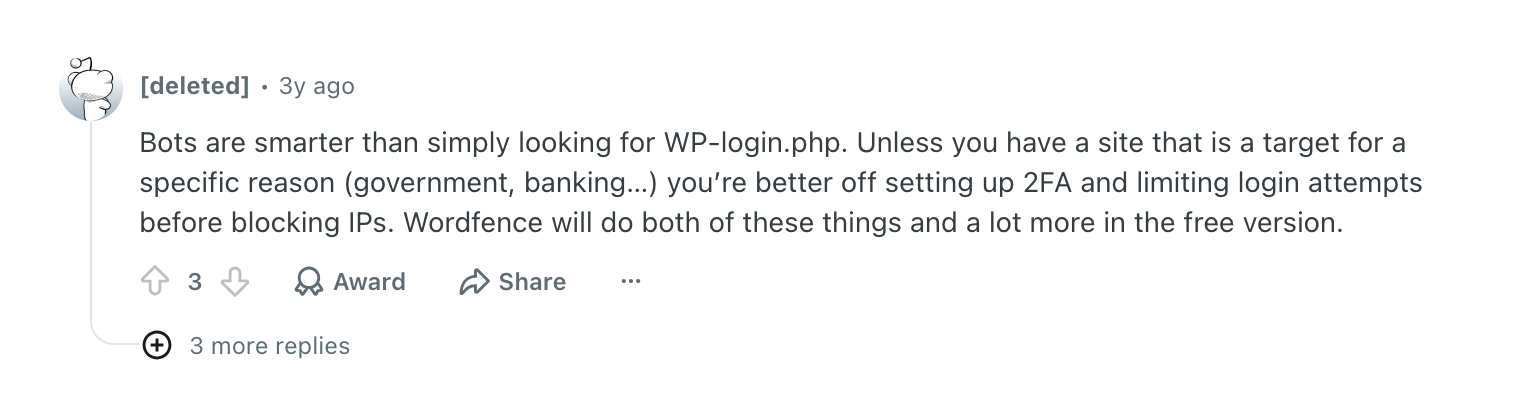
That’s the whole argument in three sentences. Unless you’re a high-value target like a bank or a government site, a hidden login page isn’t what’s standing between you and an attacker. Real protection is.
What Actually Works
If you want to genuinely reduce your risk, focus your energy here instead:
- Use strong, unique passwords. A long password with a mix of characters is exponentially harder to crack than any obscure URL is to find.
- Turn on two-factor authentication (2FA). Even if a password gets compromised, 2FA stops an attacker cold without a second verification step.
- Install a login-limiting security plugin. Tools like Wordfence or Limit Login Attempts Reloaded cap the number of failed login attempts from a single IP and lock out repeat offenders. This is the single most effective step most site owners skip.
- Keep everything updated. WordPress core, your theme, and every plugin. Most breaches exploit known vulnerabilities in outdated software, not clever guesswork.
- Consider a firewall layer. Services like Cloudflare can block malicious traffic before it ever reaches your login page in the first place.
None of this requires touching WordPress core files or introducing new points of failure into your site. It’s more effective, and it’s a lot less fragile.
Worth noting: a good chunk of this list is stuff your host should already be handling for you. Firewalls, malware scanning, and login protection are often baked into managed WordPress hosting, which is one less thing for you to configure and monitor yourself.
Don’t Branch Out Alone
Website security shouldn’t feel like guesswork, and it shouldn’t be something you bolt on after an attack already has your attention. If you want a second set of eyes on your site’s security, or you’re not sure your current setup is doing what you think it’s doing, we’re here to help.
Don't Branch Out Alone
We know that your time is limited but taking your website to the next level is essential. Don’t branch out alone. Tap into our team of experts to keep your site ahead of the curve.
Let Us Help


